Featured Post Today
print this page
Latest Post
Showing posts with label How to Unlock All Mi Account. Show all posts

How to Unlock Mi Account Xiaomi Mi 5 By Zewel Rana

How to Unlock Mi Account Xiaomi Mi 5 By Zewel Rana 

 
Mi account it a really handy feature when you want to backup all your important data, All you need to do is enter your Mi Account to your new Xiaomi device and the data will be automatically synced to your new phone, but if you accidentally Hard reset Xiaomi Mi 5, On the first boot, you are stuck on Mi account message: This device may be associated with existing Mi account please login to activate the device. Are you looking for a method to unlock Mi account on your Xiaomi Mi 5? Well in this tutorial, you can Unlock Mi Account Xiaomi Mi 5 easily by following some simple steps.

Xiaomi Mi 5 Specifications

Xiaomi Mi 5 released in February 2016. Xiaomi Mi 5 comes with 3 GB RAM and 32 GB ROM. The Xiaomi Mi 5 has a 5.15 inches IPS LCD with a resolution of 1080 x 1920 pixels, Xiaomi Mi 5 runs on Quad-core 2×1.8 GHz & 2×1.3 Qualcomm MSM8996 Snapdragon 820 chipset and powered by a 3000mAh non-removable battery. The Xiaomi Mi 5 comes with a single MAIN camera 16-megapixel and a 4-megapixel on SELFIE Camera 
THE FRPBYPASS.NET CANNOT BE RESPONSIBLE  IF YOU’RE TRYING TO BYPASS FRP ON STOLEN PHONE.

Links:

Download MiFlash Tool for Windows: Download Xiaomi Mi Flash Tool All Versions

Xiaomi Mi 5 Remove MI account firmware:

Mi 5 Remove MI account

Password: gsmhosting1 

How to Unlock Mi Account Xiaomi Mi 5

1- Run Xiaomi Mi Flash Tool.
2-Click on Select and browse to the mi 5 remove MI account firmware and press Ok.
3- Connect your Xiaomi Mi 5 in Download mode.
  • Power OFF your Xiaomi device.
  • Press & hold Volume up Button & Volume Down Button together.
  • Tab on Download option & Connect your Xiaomi to your computer via USB cable.
4- Click on the Refresh button you will see your device connected to port com.
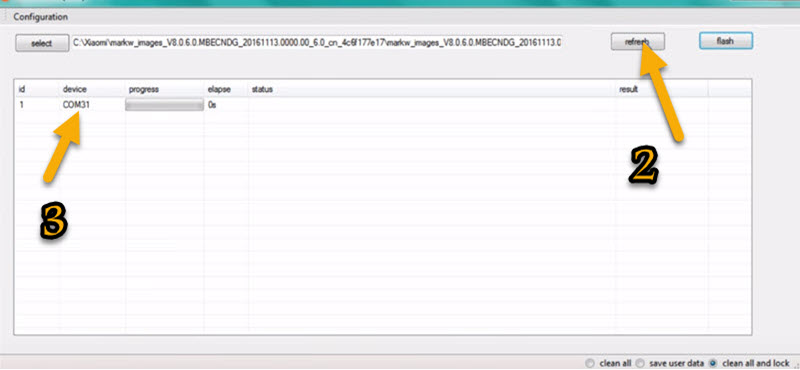
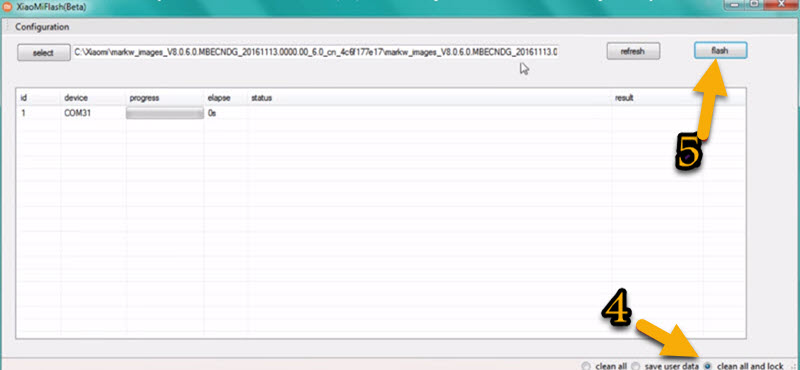
5-Click on Clean all and lock button & click on Flash button to begin flashing procedure.
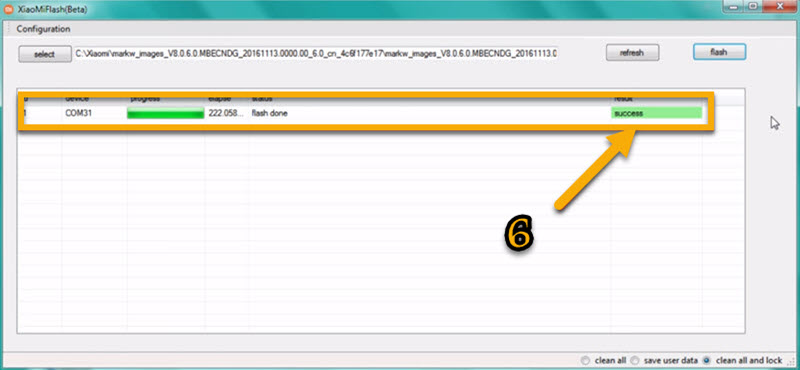
7- Well done! you have successfully Remove Mi Account on your Xiaomi Mi 5.
0 comments

How to Unlock Mi Account Xiaomi Mi 4i By Zewel Rana

How to Unlock Mi Account Xiaomi Mi 4i By Zewel Rana 


Mi account it a really handy feature when you want to backup all your important data, All you need to do is enter your Mi Account to your new Xiaomi device and the data will be automatically synced to your new phone, but if you accidentally Hard reset Xiaomi Mi 4i, On the first boot, you are stuck on Mi account message: This device may be associated with existing Mi account please login to activate the device. Are you looking for a method to unlock Mi account on your Xiaomi Mi 4i? Well in this tutorial, you can Unlock Mi Account Xiaomi Mi 4i easily by following some simple steps.

Xiaomi Mi 4i Specifications

Xiaomi Mi 4i released in April 2016. Xiaomi Mi 4i comes with 2 GB RAM and 16/32 GB ROM. The Xiaomi Mi 4i has a 5.00 inches IPS LCD with a resolution of 1080 x 1920 pixels, Xiaomi Mi 4i runs on Octa-core 4×1.7 GHz & 4×1.0 GHz Qualcomm MSM8939 Snapdragon 615 chipset and powered by a 3120mAh non-removable battery. The Xiaomi Mi 4i comes with a single MAIN camera 13-megapixel and a 5-megapixel on SELFIE Camera 
THE FRPBYPASS.NET CANNOT BE RESPONSIBLE  IF YOU’RE TRYING TO BYPASS FRP ON STOLEN PHONE.

Links:

Download MiFlash Tool for Windows: Download Xiaomi Mi Flash Tool All Versions

Xiaomi Mi 4i Remove MI account firmware:

Mi 4i Remove MI account

Password: gsmhosting4 

How to Unlock Mi Account Xiaomi Mi 4i

1- Run Xiaomi Mi Flash Tool.
2-Click on Select and browse to the Mi 4i remove MI account firmware and press Ok.
3- Connect your Xiaomi Mi 4i in Download mode.
  • Power OFF your Xiaomi device.
  • Press & hold Volume up Button & Volume Down Button together.
  • Tab on Download option & Connect your Xiaomi to your computer via USB cable.
4- Click on the Refresh button you will see your device connected to port com.
5-Click on Clean all and lock button & click on Flash button to begin flashing procedure.
7- Well done! you have successfully Remove Mi Account on your Xiaomi Mi 4i.
0 comments

How to Unlock Mi Account Xiaomi Redmi Note 4G By ZewelRana

How to Unlock Mi Account Xiaomi Redmi Note 4G By ZewelRana 


Unlock Mi Account Xiaomi Redmi Note 4G 
Mi account it a really handy feature when you want to backup all your important data, All you need to do is enter your Mi Account to your new Xiaomi device and the data will be automatically synced to your new phone, but if you accidentally Hard reset Xiaomi Redmi Note 4G, On the first boot, you are stuck on Mi account message: This device may be associated with existing Mi account please login to activate the device. Are you looking for a method to unlock Mi account on your Xiaomi Redmi Note 4G? Well in this tutorial, you can Unlock Mi Account Xiaomi Redmi Note 4G easily by following some simple steps.

Xiaomi Redmi Note 4G Specifications

Xiaomi Redmi Note 4G released in August 2014. Xiaomi Redmi Note 4G comes with 2 GB RAM and 8 GB ROM. The Xiaomi Redmi Note 4G has a 5.50 inches IPS LCD with a resolution of 1080 x 1920 pixels, Xiaomi Redmi Note 4G runs on Quad-core 1.6 GHz Qualcomm MSM8928 Snapdragon 400 chipset and powered by a 3100mAh removable battery. The Xiaomi Redmi Note 4G comes with a single MAIN camera 13-megapixel and a 5-megapixel on SELFIE Camera. 
THE FRPBYPASS.NET CANNOT BE RESPONSIBLE  IF YOU’RE TRYING TO BYPASS FRP ON STOLEN PHONE.

Links:

Download MiFlash Tool for Windows: Download Xiaomi Mi Flash Tool All Versions

Xiaomi Redmi Note 4G Dual Sim Remove MI account firmware:

Redmi Note 4G Dual Sim Remove MI account

Password: gsmhosting2 

Xiaomi Redmi Note 4G LTE Remove MI account firmware:

Redmi Note 4G LTE Remove MI account

Password: gsmhosting3

How to Unlock Mi Account Xiaomi Redmi Note 4G

1- Run Xiaomi Mi Flash Tool.
2-Click on Select and browse to the Redmi Note 4G remove MI account firmware and press Ok.
 
3- Connect your Xiaomi Redmi Note 4G in Download mode.
  • Power OFF your Xiaomi device.
  • Press & hold Volume up Button & Volume Down Button together.
  • Tab on Download option & Connect your Xiaomi to your computer via USB cable.
4- Click on the Refresh button you will see your device connected to port com.
5-Click on Clean all and lock button & click on Flash button to begin flashing procedure.
7- Well done! you have successfully Remove Mi Account on your Xiaomi Redmi Note 4G.
0 comments

How to Unlock Mi Account Xiaomi Mi 3 By ZewelRana

How to Unlock Mi Account Xiaomi Mi 3 By ZewelRana 

Unlock Mi Account Xiaomi Mi 3 
Mi account it a really handy feature when you want to backup all your important data, All you need to do is enter your Mi Account to your new Xiaomi device and the data will be automatically synced to your new phone, but if you accidentally Hard reset Xiaomi Mi 3, On the first boot, you are stuck on Mi account message: This device may be associated with existing Mi account please login to activate the device. Are you looking for a method to unlock Mi account on your Xiaomi Mi 3? Well in this tutorial, you can Unlock Mi Account Xiaomi Mi 3 easily by following some simple steps.

Xiaomi Mi 3 Specifications

Xiaomi Mi 3 released in December 2013. Xiaomi Mi 3 comes with 2 GB RAM and 16/64 GB ROM. The Xiaomi Mi 3 has a 5.50 inches IPS LCD with a resolution of 1080 x 1920 pixels, Xiaomi Mi 3 runs on Quad-core 2.3 GHz Qualcomm MSM8274AB Snapdragon 800 chipset and powered by a 3050mAh non-removable battery. The Xiaomi Mi 3 comes with a single MAIN camera 13-megapixel and a 2-megapixel on SELFIE Camera 
THE FRPBYPASS.NET CANNOT BE RESPONSIBLE  IF YOU’RE TRYING TO BYPASS FRP ON STOLEN PHONE.

Links:

Download MiFlash Tool for Windows: Download Xiaomi Mi Flash Tool All Versions

Xiaomi Mi 3 Remove MI account firmware:

Mi 3 Remove MI account

Password: gsmhosting1 

How to Unlock Mi Account Xiaomi Mi 3

1- Run Xiaomi Mi Flash Tool.
2-Click on Select and browse to the Mi 3 remove MI account firmware and press Ok.
3- Connect your Xiaomi Mi 3 in Download mode.
  • Power OFF your Xiaomi device.
  • Press & hold Volume up Button & Volume Down Button together.
  • Tab on Download option & Connect your Xiaomi to your computer via USB cable.
4- Click on the Refresh button you will see your device connected to port com.
5-Click on Clean all and lock button & click on Flash button to begin flashing procedure.
7- Well done! you have successfully Remove Mi Account on your Xiaomi Mi 3.
0 comments

How to Unlock Mi Account Xiaomi Redmi 2 By ZewelRana

How to Unlock Mi Account Xiaomi Redmi 2 By ZewelRana 


Unlock Mi Account Xiaomi Redmi 2 
Mi account it a really handy feature when you want to backup all your important data, All you need to do is enter your Mi Account to your new Xiaomi device and the data will be automatically synced to your new phone, but if you accidentally Hard reset Xiaomi Redmi 2, On the first boot, you are stuck on Mi account message: This device may be associated with existing Mi account please login to activate the device. Are you looking for a method to unlock Mi account on your Xiaomi Redmi 2? Well in this tutorial, you can Unlock Mi Account Xiaomi Redmi 2 easily by following some simple steps.

Xiaomi Redmi 2 Specifications

Xiaomi Redmi 2 released in January 2015. Xiaomi Redmi 2 comes with 1/2 GB RAM and 8/16 GB ROM. The Xiaomi Redmi 2 has a 4.70 inches IPS LCD with a resolution of 720 x 1280 pixels, Xiaomi Redmi 2 runs on Quad-core 1.2 GHz Qualcomm MSM8916 Snapdragon 410 chipset and powered by a 2200mAh removable battery. The Xiaomi Redmi 2 comes with a single MAIN camera 8-megapixel and a 2-megapixel on SELFIE Camera. 
THE FRPBYPASS.NET CANNOT BE RESPONSIBLE  IF YOU’RE TRYING TO BYPASS FRP ON STOLEN PHONE.

Links:

Download MiFlash Tool for Windows: Download Xiaomi Mi Flash Tool All Versions

Xiaomi Redmi 2 Remove MI account firmware:

Redmi 2 Remove MI account

Password: gsmhosting6

 How to Unlock Mi Account Xiaomi Redmi 2

1- Run Xiaomi Mi Flash Tool.
2-Click on Select and browse to the Redmi 2 remove MI account firmware and press Ok.
3- Connect your Xiaomi Redmi 2 in Download mode.
  • Power OFF your Xiaomi device.
  • Press & hold Volume up Button & Volume Down Button together.
  • Tab on Download option & Connect your Xiaomi to your computer via USB cable.
4- Click on the Refresh button you will see your device connected to port com.
5-Click on Clean all and lock button & click on Flash button to begin flashing procedure.
7- Well done! you have successfully Remove Mi Account on your Xiaomi Redmi 2.

0 comments

How to Unlock Mi Account Xiaomi Redmi 1S By ZewelRana

How to Unlock Mi Account Xiaomi Redmi 1S By ZewelRana

Unlock Mi Account Xiaomi Redmi 1S 
Mi account it a really handy feature when you want to backup all your important data, All you need to do is enter your Mi Account to your new Xiaomi device and the data will be automatically synced to your new phone, but if you accidentally Hard reset Xiaomi Redmi 1S, On the first boot, you are stuck on Mi account message: This device may be associated with existing Mi account please login to activate the device. Are you looking for a method to unlock Mi account on your Xiaomi Redmi 1S? Well in this tutorial, you can Unlock Mi Account Xiaomi Redmi 1S easily by following some simple steps.

Xiaomi Redmi 1S Specifications

Xiaomi Redmi 1S released in May 2014. Xiaomi Redmi 1S comes with 1 GB RAM and 8 GB ROM. The Xiaomi Redmi 1S has a 4.70 inches IPS LCD with a resolution of 720 x 1280 pixels, Xiaomi Redmi 1S runs on Quad-core 1.6 GHz Qualcomm MSM8228 Snapdragon 400 chipset and powered by a 2000mAh removable battery. The Xiaomi Redmi 1S comes with a single MAIN camera 8-megapixel and a 1.6-megapixel on SELFIE Camera 
THE FRPBYPASS.NET CANNOT BE RESPONSIBLE  IF YOU’RE TRYING TO BYPASS FRP ON STOLEN PHONE.

Links:

Download MiFlash Tool for Windows: Download Xiaomi Mi Flash Tool All Versions

Xiaomi Redmi 1S Remove MI account firmware:

Redmi 1S Remove MI account

Password: gsmhosting7 

How to Unlock Mi Account Xiaomi Redmi 1S

1- Run Xiaomi Mi Flash Tool.
2-Click on Select and browse to the Redmi 1S remove MI account firmware and press Ok.
3- Connect your Xiaomi Redmi 1S in Download mode.
  • Power OFF your Xiaomi device.
  • Press & hold Volume up Button & Volume Down Button together.
  • Tab on Download option & Connect your Xiaomi to your computer via USB cable.
4- Click on the Refresh button you will see your device connected to port com.
5-Click on Clean all and lock button & click on Flash button to begin flashing procedure.
7- Well done! you have successfully Remove Mi Account on your Xiaomi Redmi 1S.
0 comments

How to Unlock Mi Account Xiaomi Mi 4 By ZewelRana

How to Unlock Mi Account Xiaomi Mi 4 By ZewelRana 

Unlock Mi Account Xiaomi Mi 4 
Mi account it a really handy feature when you want to backup all your important data, All you need to do is enter your Mi Account to your new Xiaomi device and the data will be automatically synced to your new phone, but if you accidentally Hard reset Xiaomi Mi 4, On the first boot, you are stuck on Mi account message: This device may be associated with existing Mi account please login to activate the device. Are you looking for a method to unlock Mi account on your Xiaomi Mi 4? Well in this tutorial, you can Unlock Mi Account Xiaomi Mi 4 easily by following some simple steps.

Xiaomi Mi 4 Specifications

Xiaomi Mi 4 released in July 2014. Xiaomi Mi 4 comes with 2/3 GB RAM and 16/64 GB ROM. The Xiaomi Mi 4 has a 5.00 inches IPS LCD with a resolution of 1080 x 1920 pixels, Xiaomi Mi 4 runs on Quad-core 2.5 GHz Qualcomm MSM8974AC Snapdragon 801 chipset and powered by a 3080mAh non-removable battery. The Xiaomi Mi 4 comes with a single MAIN camera 13-megapixel and an 8-megapixel on SELFIE Camera. 
THE FRPBYPASS.NET CANNOT BE RESPONSIBLE  IF YOU’RE TRYING TO BYPASS FRP ON STOLEN PHONE.

Links:

Download MiFlash Tool for Windows: Download Xiaomi Mi Flash Tool All Versions

Xiaomi Mi 4 Remove MI account firmware:

Mi 4 Remove MI account  

How to Unlock Mi Account Xiaomi Mi 4

1- Run Xiaomi Mi Flash Tool. 
2-Click on Select and browse to the Mi 4 remove MI account firmware and press Ok.
3- Connect your Xiaomi Mi 4 in Download mode.
  • Power OFF your Xiaomi device.
  • Press & hold Volume up Button & Volume Down Button together.
  • Tab on Download option & Connect your Xiaomi to your computer via USB cable.
4- Click on the Refresh button you will see your device connected to port com.
5-Click on Clean all and lock button & click on Flash button to begin flashing procedure.
7- Well done! you have successfully Remove Mi Account on your Xiaomi Mi 4.


0 comments

How to Unlock Mi Account Xiaomi Mi 5s Plus By ZewelRana

How to Unlock Mi Account Xiaomi Mi 5s Plus By ZewelRana 

Unlock Mi Account Xiaomi Mi 5s Plus 
Mi account it a really handy feature when you want to backup all your important data, All you need to do is enter your Mi Account to your new Xiaomi device and the data will be automatically synced to your new phone, but if you accidentally Hard reset Xiaomi Mi 5s Plus, On the first boot, you are stuck on Mi account message: This device may be associated with existing Mi account please login to activate the device. Are you looking for a method to unlock Mi account on your Xiaomi Mi 5s Plus? Well in this tutorial, you can Unlock Mi Account Xiaomi Mi 5s Plus easily by following some simple steps.

Xiaomi Mi 5s Plus Specifications

Xiaomi Mi 5s Plus released in September 2016. Xiaomi Mi 5s Plus comes with 4/6 GB RAM and 64/128 GB ROM. The Xiaomi Mi 5s Plus has a 5.70 inches IPS LCD with a resolution of 1080 x 1920 pixels, Xiaomi Mi 5s Plus runs on Quad-core 2×2.35 GHz & 2×2.2 GHz Qualcomm MSM8996 Snapdragon 821 chipset and powered by a 3800mAh non-removable battery. The Xiaomi Mi 5s Plus comes with a Dual MAIN camera 13-megapixel + 13-megapixel and a 4-megapixel on SELFIE Camera. 
HE FRPBYPASS.NET CANNOT BE RESPONSIBLE  IF YOU’RE TRYING TO BYPASS FRP ON STOLEN PHONE.

Links:

Download MiFlash Tool for Windows: Download Xiaomi Mi Flash Tool All Versions

Xiaomi Mi 5s Plus Remove MI account firmware:

Mi 5s Plus Remove MI account


How to Unlock Mi Account Xiaomi Mi 5s Plus

1- Run Xiaomi Mi Flash Tool.
2-Click on Select and browse to the Mi 5s Plus remove MI account firmware and press Ok 
 
3- Connect your Xiaomi Mi 5s Plus in Download mode.
  • Power OFF your Xiaomi device.
  • Press & hold Volume up Button & Volume Down Button together.
  • Tab on Download option & Connect your Xiaomi to your computer via USB cable.
4- Click on the Refresh button you will see your device connected to port com 
 
5-Click on Clean all and lock button & click on Flash button to begin flashing procedure 
  
7- Well done! you have successfully Remove Mi Account on your Xiaomi Mi 5s Plus 
 
Once the mi Account is removed, do not connect your Xiaomi Mi 5s Plus to the internet (wifi or data),  & do a factory reset, this file under test and there may be a failure, any questions or problems comment, thank you very much

0 comments
 
Support : My Channel YouTube | Johny Template | Mas Template
Copyright © 2011. FRP Bypass24.com - All Rights Reserved
Template Created by Creating Website Published by Mas Template
Proudly powered by Blogger