Featured Post Today
print this page
Latest Post

Latest Huawei FRP Tool Easy Remove Accounts By AMS TECH

Latest Huawei FRP Tool Easy Remove Accounts By AMS TECH 


Download Huawei FRP Tool 
Are your Owen a Huawei phone and you have stuck at Factory reset protection and looking for an FRP Tool to remove Gmail account then Huawei FRP Tool can surely help you. You can bypass FRP lock easily with this Huawei Tool. You just need to download Huawei FRP Tool and you will be able to bypass google account lock and get full access to your Huawei device.
If you can’t remember the Google Account or password that you set up in your Huawei mobile after performing a hard reset. if you are stuck with this FRP lock on your Huawei device you have to find the Easy and best way to Bypass FRP Google account lock. So Here are Complete Details How to Unlock FRP Lock to delete the Gmail account via this Huawei FRP Tool. 

Download Huawei FRP Unlock Tool:

Here you can download the Huawei FRP Unlock Tool for Huawei Device. all Huawei devices work well with this Huawei FRP Unlock Tool.
File Name: Latest Huawei FRP Tool Easy Remove Accounts.rar
Size: 10.11 Mo
Supported OS: Windows

Download Link: Huawei FRP Unlock Tool password: ams tech 
How to Use Huawei FRP Unlock Tool
  • First Download Huawei USB Driver
    • Download And Install Huawei USB Drivers For Windows
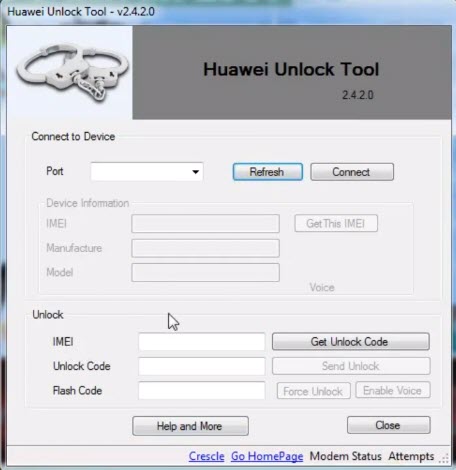
  • Download FRP Tool on your computer and click on HuaweiFrpTool.exe
  • Restart your Huawei device to recovery mode:
    • Turn OFF your Huawei mobile
    • Press & hold the Volume Up button + the Power button for a few seconds.
    • Then Connect The Huawei Device to the Computer.
  • Click on Read Info to check The Huawei mobile Connected or Not.
  • Then click on Reset FRP to Bypass FRP Gmail account from your Huawei smartphone or tablets.
I hope it helped. If any questions feel free to comment below!
0 comments

FRP Bypass Huawei Nova 3i – Unlock FRP LOCK Huawei INE-LX1 ZewelRana

FRP Bypass Huawei Nova 3i – Unlock FRP LOCK Huawei INE-LX1 ZewelRana 

FRP Bypass Huawei Nova 3i 
Google has added a security feature (Factory Reset Protection) to its Android OS. After the hard reset process, the OS asks you to enter the last Google account used in the phone before performing the factory reset to verify the identity of the real owner of the phone. This feature is important and is intended to avoid misuse of the device during thefts. But at the same time, some users have got into trouble because of it, when they have forgotten their GMAIL or password credentials after the hard reset. So, in this tutorial, we have brought the latest method to FRP Bypass Huawei Nova 3i – Unlock FRP LOCK Huawei INE-LX1 easily by following some simple steps.
The FRP feature has been added to the phones that are available on the modern Android systems (Lollipop, Marshmallow, Nougat, Oreo, Pie), The process of bypassing FRP in the latest versions of Google’s Android is becoming challenging with every phone and every system and every version has a specific way to bypass this problem 
Once you set up a Google Account in your Huawei Nova 3i, the FRP is active, so after performing a Factory Data Reset, you’ll be required to log in to the GMAIL username and password that you set up on the device, so if your Huawei Nova 3i is stolen or lost, the device can’t be used. In that case, frpbypass.net will give an amazing way to the FRP unlocking process for your Huawei Nova 3i mobile, you can get a safe FRP unlocking experience to your Huawei Nova 3i device easily and smoothly.
The FRP bypass process available for free and you can use the FRP bypass app tool compatible with your device and we have brought the latest FRP Bypass APK which can help to bypass FRP on your Huawei Nova 3i easily. 

Huawei Nova 3i Specifications:

Huawei Nova 3i released in July 2018. Huawei Nova 3i comes with 4/6 GB ram and 64/128 GB ROM. The Huawei Nova 3i has a 6.30 inches IPS LCD with a resolution of 1080 x 2340 pixels, Huawei Nova 3i runs on Octa-core 4×2.2 GHz & 4×1.7 GHz Hisilicon Kirin 710 chipset, and powered by a 3340mAh non-removable battery. The Huawei Nova 3i comes with a Dual camera 16-megapixel + 2-megapixel MAIN Camera and Dual 24-megapixel + 2-megapixel on SELFIE Camera.
THE FRPBYPASS.NET CANNOT BE RESPONSIBLE  IF YOU’RE TRYING TO BYPASS FRP ON STOLEN PHONE.

How to disable FRP (factory reset protection):

in your Huawei Nova 3i device, The FRP feature will automatically Enable as soon as you add a Google Account to your Huawei Nova 3i. If you want to disable it, you just need to delete your account.

Add a Google account on Huawei Nova 3i:
Settings >>> Accounts >>> Add an account >>> Google.
Enter your Gmail account information.
Remove Google account on Huawei Nova 3i:
 Settings >>> Accounts >>> Google.
Choose the added Gmail account.
Find Remove account by clicking the icon on the top right corner.

Links:

How to Bypass FRP Huawei Nova 3i

  • You need an SD card with 8 GB space.
  • Now download the Downgrade firmware for your Huawei Nova 3i
  • Create a new folder in your SD card, and rename it to dload & Unzip the downloaded firmware zip file.
  • Dial *#*#2846579#*#*
    • software upgrade ==>sd card update and the update should start
  • If code does not work, then press & hold the volume up + The volume down first then press the power button and keep pressing all together.
  • Your phone will detect the package and will start the update process automatically.
  • The first boot may take up to 5 minutes so be patient.
  • Now you need to Hard reset your Huawei Nova 3i mobile:
    • Press & Hold Volume Up + Power buttons until you see Huawei Logo.
    • In the Hard reset Page choose wipe data/factory reset using Volume buttons, and tap on Power button to confirm
    • Then choose wipe data/factory reset.
    • Wait until the hard reset process finishes.
  • Once the hard reset ends to select the Safe Mode option using Volume buttons, and tap on the Power button to confirm.
  • Once the Huawei Nova 3i turns on in Safe mode Go to Setting ==> System.
  • Tap on Reset.
  • Tab on Reset all settings.
  • Select Reset all settings.
  • Finally, Restart your Huawei Nova 3i.
  • You have successfully FRP Bypass Huawei Nova 3i – Unlock FRP LOCK Huawei INE-LX1.
0 comments

How To FRP Bypass Xiaomi Redmi K30 | FRP Unlock Android 10 MIUI 11 ZewelRana

 How To FRP Bypass Xiaomi Redmi K30 | FRP Unlock Android 10 MIUI 11 ZewelRana 

Bypass FRP Xiaomi Redmi K30 
Google has added a security feature (Factory Reset Protection) to its Android OS. After the hard reset process, the OS asks you to enter the last Google account used in the phone before performing the factory reset to verify the identity of the real owner of the phone. This feature is important and is intended to avoid misuse of the device during thefts. But at the same time, some users have got into trouble because of it, when they have forgotten their GMAIL or password credentials after the hard reset. So, in this tutorial, we have brought the latest method to Bypass FRP Xiaomi Redmi K30 | FRP Unlock Android 10 MIUI 11 easily by following some simple steps.
Once you set up a Google Account in your Xiaomi Redmi K30, the FRP is active, so after performing a Factory Data Reset, you’ll be required to log in to the GMAIL username and password that you set up on the device, so if your Xiaomi Redmi K30 is stolen or lost, the device can’t be used. In that case, frpbypass.net will give an amazing way to the FRP unlocking process for your Xiaomi Redmi K30 mobile, you can get a safe FRP unlocking experience to your Xiaomi Redmi K30 device easily and smoothly. 
The FRP bypass process available for free and you can use the FRP bypass app tool compatible with your device and we have brought the latest FRP Bypass APK which can help to bypass FRP on your Xiaomi Redmi K30 easily.
The FRP feature has been added to the phones that are available on the modern Android systems (Lollipop, Marshmallow, Nougat, Oreo, Pie), The process of bypassing FRP in the latest versions of Google’s Android is becoming challenging with every phone and every system and every version has a specific way to bypass this problem. 

Xiaomi Redmi K30 Specifications

Xiaomi Redmi K30 released in December 2019. Xiaomi Redmi K30 comes with 6/8 GB RAM and 64/128/256 GB ROM. The Xiaomi Redmi K30 has a 6.67 inches IPS LCD with a resolution of 1080 x 2400 pixels, Xiaomi Redmi K30 runs on Octa-core 2×2.2 GHz Kryo & 6×1.8 GHz Qualcomm SDM730 Snapdragon 730G chipset and powered by a 4500mAh non-removable battery. The Xiaomi Redmi K30 comes with a QuadMAIN camera 64-megapixel + 8-megapixel + 2-megapixel + 2-megapixel and a Dual 20-megapixel + 2-megapixel on SELFIE Camera.
THE FRPBYPASS.NET CANNOT BE RESPONSIBLE  IF YOU’RE TRYING TO BYPASS FRP ON STOLEN PHONE.

How to disable FRP (factory reset protection):

in your Xiaomi Redmi K30 device, The FRP feature will automatically Enable as soon as you add a Google Account to your Xiaomi Redmi K30. If you want to disable it, you just need to delete your account.

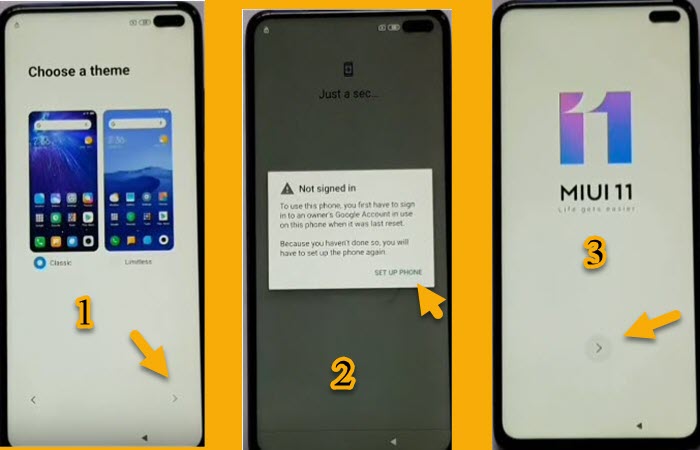
How to FRP Bypass Xiaomi Redmi K30

  • Power ON your Xiaomi Redmi K30.
  • Choose any language the choose any region.
  • Click on Skip ==> Next ==> Next.
  • Click on Accept.
  • Now, Set up a new Fingerprint ==> Pattern.
  • Draw unlock Pattern ==> Add your fingerprint.
  • Fingerprint added successfully.
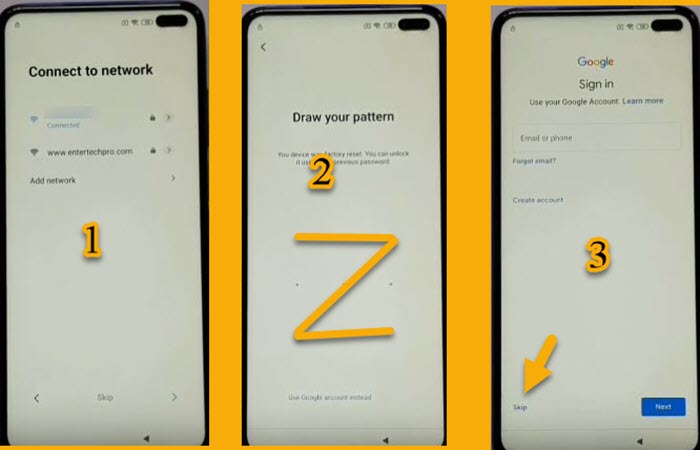
  • You stuck on Not signed in message again.
  • Now Connect your Xiaomi Redmi K30 to your Wi-Fi.
  • Draw your pattern that you set up early then click on Skip.
  • That’s how you can Bypass FRP Xiaomi Redmi K30 | FRP Unlock Android 10 MIUI 11.
IF YOU HAVE ANY DOUBTS OR FACE ANY KIND OF PROBLEM WITH THIS METHOD, COMMENT BELOW.
0 comments

All In One FRP Tools – Free Android FRP TOOLS Free Download

All In One FRP Tools – Free Android FRP TOOLS Free Download  

Download All In One FRP Tools 
All In One FRP Tools is a lot of Windows software developed by Mobile Tech Channel, Download All In One FRP Tools Includes all this tool for free: Uat tool v5.02 tool + keygen, GSM Aladdin tool v21.42 + keygen, miracle box 2.54 + keygen, Nck MTK TOOL, Ultimate Multi-tool gsm, Oppo A37 user lock, miracle box 2.27, Gsd android tool, infinity BEST, Android fastboot, GSM Multi hub v0.5.1, Huawei tool v2.4.2.0, Jony New FRP TOOL, Oppo Unlocker free, Read-write v.1.1, Samsung FRP Tool, Mi account tool, MTK extractor v2.6.3, MTK FRP tool.
 
All In One FRP Tools it is very easy to use and One of the most benefits of using these tools is it’s free. which is used when you want to FRP Bypass all kind of Android device, This is useful when you want to Read Pattern, Reset Pattern, Remove Pattern, Factory Reset, Anti Malware, Adb Locks, BootLoder Unlock, Read Locks, Formatting, Remove Locks, Dead Phone, Flashing, IMEI Repairing, IMEI Write, Remove or bypass FRP protection, Reset the face lock, Languages enable, Read and write the EMMC pattern cod,e Repair the Wi-Fi, Fix Downloadmode, Safe Format the device, Bypass Mi account, FRP Mi cloud account…
 
Once you download this tool then install it on your system. You can use all the tools provided on your Android device. It works on Huawei, Samsung, Sony, Motorola, MTK & Snapdragon chipset.

Download All In One FRP Tools:

Here you can download the All In One FRP Tools for Android Device. all Android devices work well with this All In One FRP Tools.
File Name: All In One FRP Tools.rar
Size: 827 Mo
Supported OS: Windows

Download Link: All In One FRP-Tools

How to Install All In One FRP Tools
  • Download FRP Tool on your computer and click on All In One FRP Tools.exe
  • Click Next
  • Enter the Password: Mobile Tech Channel.
  • Press Install And Click Finish.
I hope it helped. If any questions feel free to comment below!
2 comments

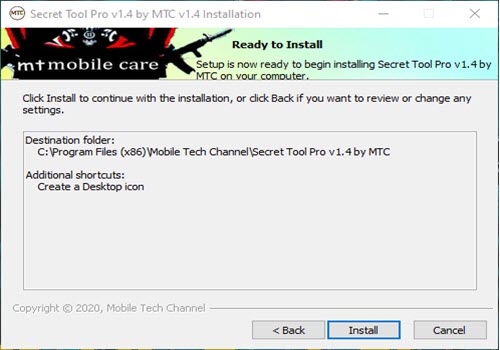
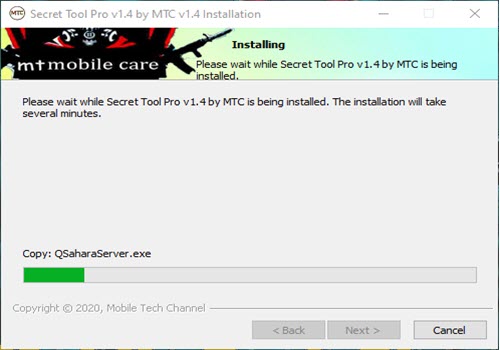
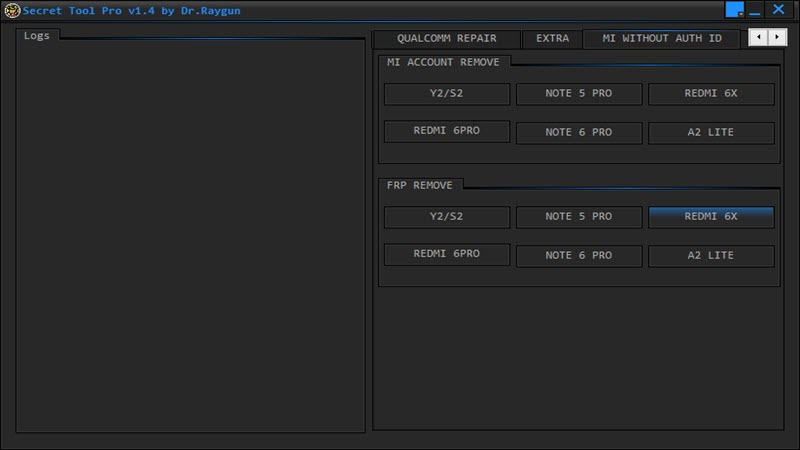
Secret Tool Pro v1.4 – FRP Tools / Flash Tools / Repair Tools Free Download

Secret Tool Pro v1.4 – FRP Tools / Flash Tools / Repair Tools Free Download  

Download Secret Tool Pro 
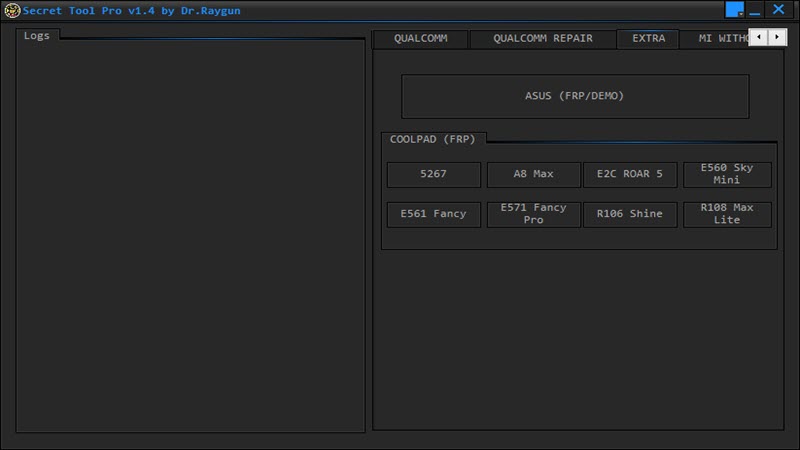
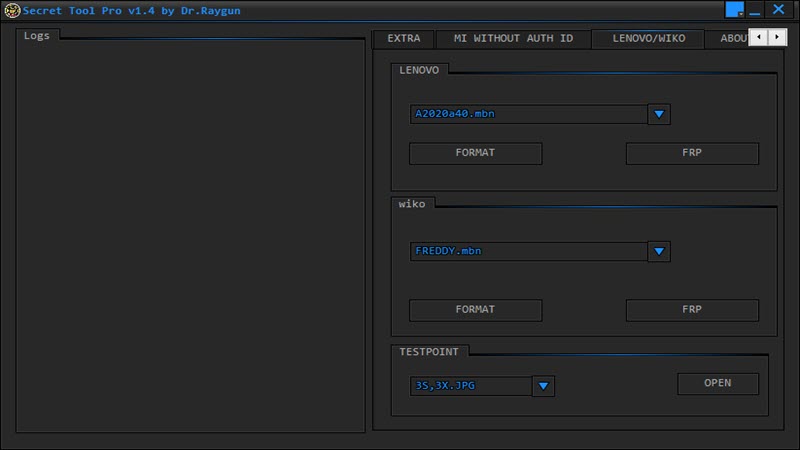
Are you an Android smartphone or Tablet User? Then Download Secret Tool Pro is a free Windows software developed by MTC that works perfectly for your Android mobile. Secret Frp Tool Pro can use with Samsung, Oppo, Vivo, Xiaomi, Asus, CoolPad, MTK devices, Wiko, Lenovo, and SPD devices.
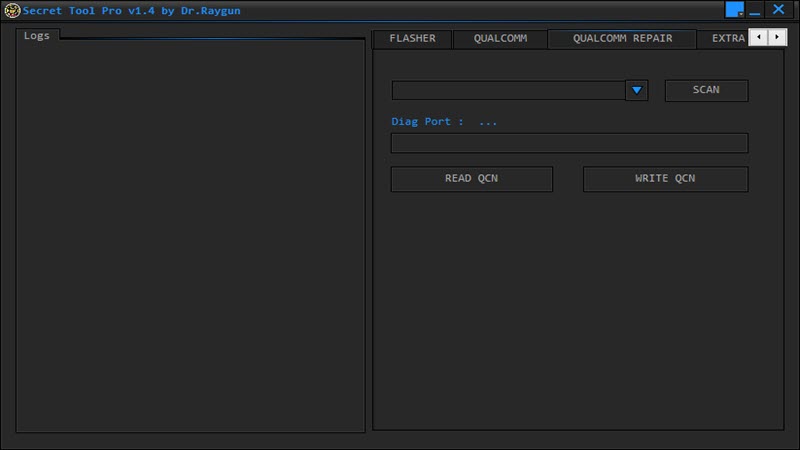
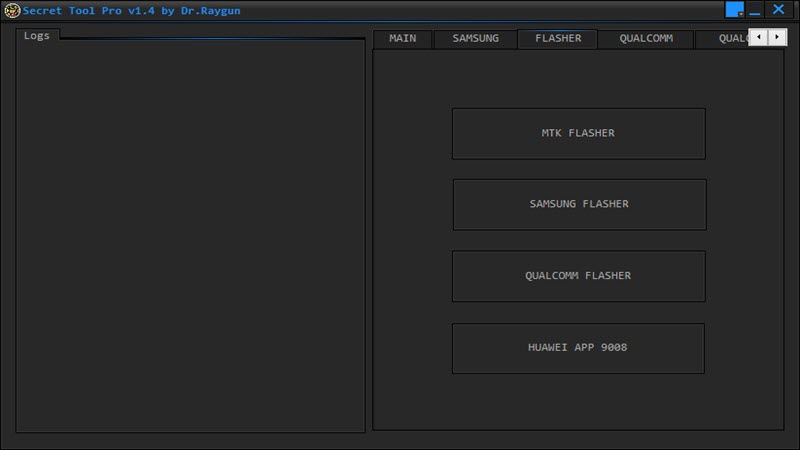
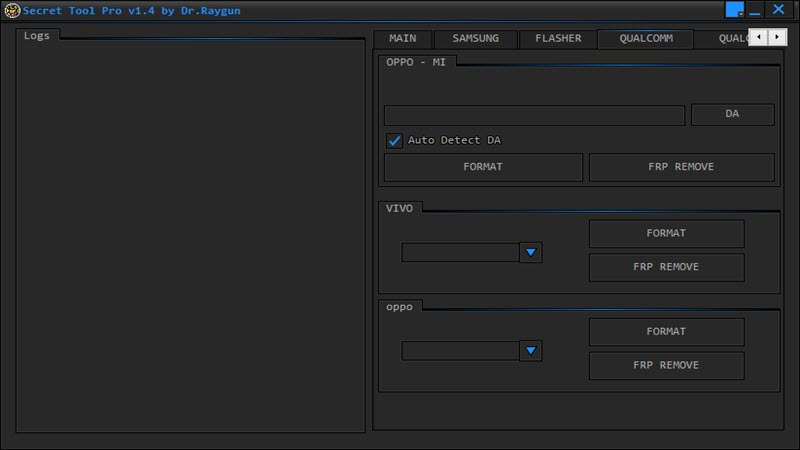
Secret Frp Tool Pro allows to Android users to read the info of your device, Remove FRP lock from your device, Remove Samsung account, Xiaomi relock fix, Enable ADB on Huawei mobile, Bypass Huawei FRP, Unlock Xiaomi FRP Lock, Enable Diag on OPPO, Reboot your device to recovery mode, Reboot fastboot mode, Reboot normal mode, Samsung Baseband repair,  repair Samsung Emergency calls, repair modem, Samsung Flasher, Qualcomm Flasher, Unlock Samsung FRP, MTK Flasher, Qualcomm FRP Remove, Vivo FRP Unlock, Oppo FRP Unlock, Format Oppo, Format Vivo, Read and write QCN, Bypass FRP Asus, Coolpad FRP Remove, Unlock Mi account, format, and FRP Lenovo, flash with test point, FRP Wiko. You can enjoy all these features with the Secret Frp Pro tool to enhance the whole performance of your android device. 
NOTICE: MAKE SURE YOU’VE ALREADY TURN OFF YOUR ANTIVIRUS SOFTWARE, OTHERWISE, YOU WON’T BE ABLE TO USE SECRET FRP TOOL PRO 

Download Secret Frp Tool Pro:

Here you can download the Secret Frp Tool Pro for Android Device. all Android mobile works well with this Secret Frp Tool Pro.
File Name: Secret Frp Tool Pro v1.4 by MTC.rar
Size: 92 Mo
Supported OS: Windows XP, Windows 7, Windows 8, Windows 8.1, Windows 10

Download Link: Secret Frp Tool Pro v1.4
1 comments

How To FRP Bypass Samsung J3 V / Gmail Lock Bypass Android 8.0.0 Oreo ZewelRana

 How To FRP Bypass Samsung J3 V / Gmail Lock Bypass Android 8.0.0 Oreo ZewelRana 

Bypass FRP Samsung J3 V 
Google has added a security feature (Factory Reset Protection) to its Android OS. This feature is important and is intended to avoid misuse of the device during thefts. But at the same time, some users have got into trouble because of it, when they have forgotten their GMAIL or password credentials after the hard reset. So, in this tutorial, we have brought the latest method to Bypass FRP Samsung J3 V / Gmail Lock Bypass Android 8.0.0 Oreo easily by following some simple steps.
Once you set up a Google Account in your Samsung J3 V, the FRP is active, so after performing a Factory Data Reset, you’ll be required to log in to the GMAIL username and password that you set up on the device, so if your Samsung J3 V is stolen or lost, the device can’t be used. In that case, frpbypass.net will give an amazing way to the FRP unlocking process for your Samsung J3 V mobile, you can get a safe FRP unlocking experience to your Samsung J3 V device easily and smoothly. 
The FRP bypass process available for free and you can use the FRP bypass app tool compatible with your device and we have brought the latest FRP Bypass APK which can help to bypass FRP on your Samsung J3 V easily.
The process of bypassing FRP in the latest versions of Google’s Android is becoming challenging with every update and every new device. 
Samsung Galaxy J3 V Specifications:
Samsung Galaxy J3 V released in June 2018. Samsung Galaxy J3 comes with 2 GB RAM and 16 ROM. The Samsung Galaxy J3 V has a 5.00 inches IPS LCD with a resolution of 720 x 1280 pixels, Samsung Galaxy J3 V runs on Quad-core 1.4 GHz Exynos 7570 Quad chipset, and powered by a 2600mAh removable battery. The Samsung Galaxy J3 V comes with an 8-megapixel MAIN Camera and 5-megapixel on SELFIE Camera.

Remove FRP Samsung J3 V:

1- Power ON your Samsung J3 V
2- Connect your Samsung mobile to your Wi-Fi.
3- Press 3 time on Home button to Turn ON TalkBack
4- After talkback tutorial appears, swipe the letter L on the screen
5- Then double tab on TalkBack Setting
6- Press 3 time on Home button to Turn OFF TalkBack
7- Then Tab on help & feedback
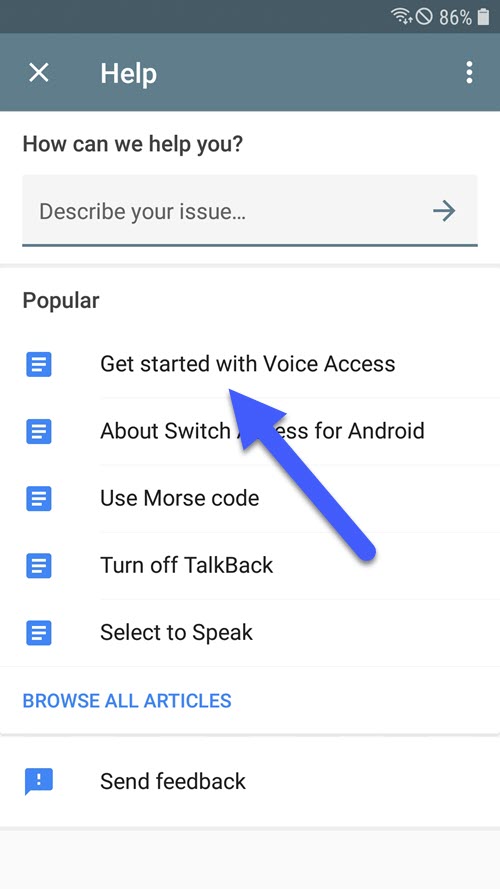
8- Tab on Get started with Voice Access & click on the video to play it on the youtube app.
9- Click on Account === Terms & privacy policy
10- The Internet browser will open automatically
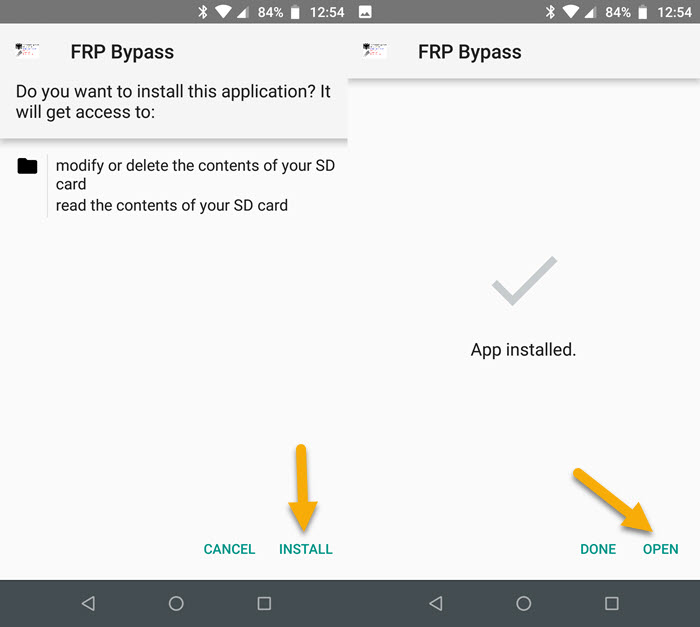
11- Download, install & open FRP Bypass app
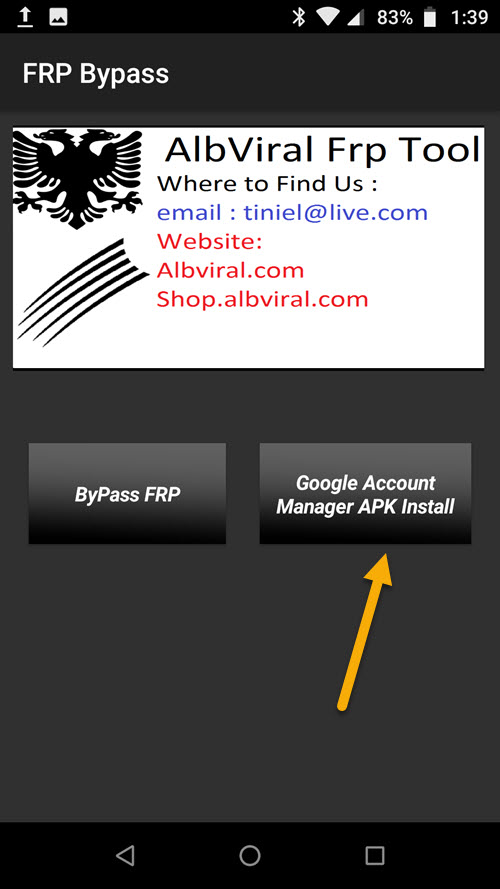
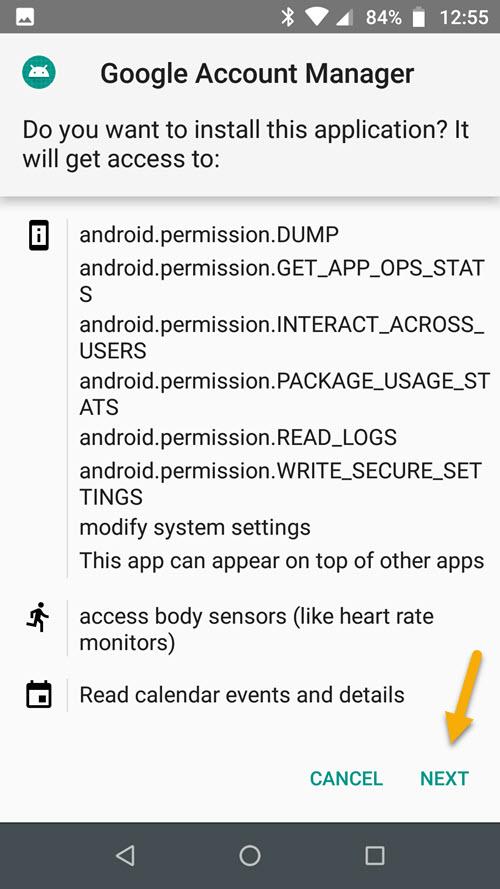
12- Click on Google Account Manager APK Install.
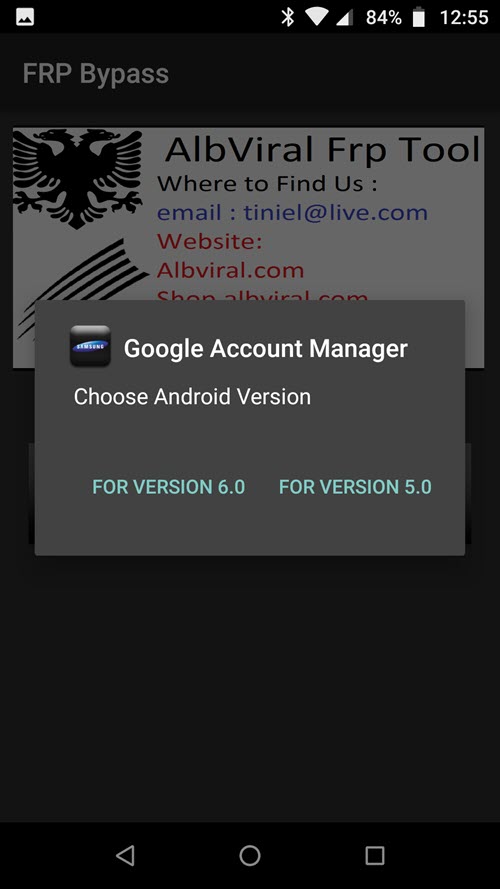
13- Choose Version 5.0 for Android 8
14- Then install Google Account Manager APK
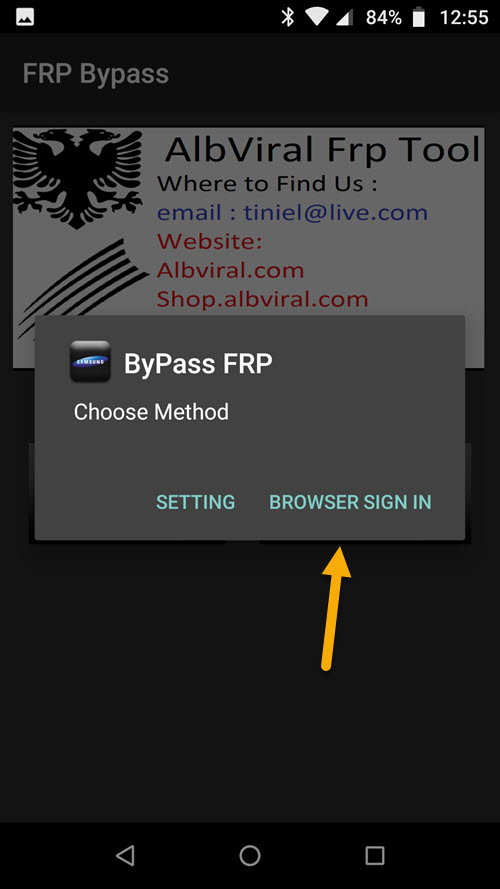
15- Go back to FRP Bypass app & tab on ByPass FRP
16- Click on BROWSER SIGN IN
17- Click on 3 dots upright & choose browser sign in
18- Sign in with your Gmail address & confirm.
19- That’s it! Restart your Samsung J3 V & you have successfully Bypass FRP Samsung J3 V / Gmail Lock Bypass Android 8.0.0 Oreo.
0 comments
 
Support : My Channel YouTube | Johny Template | Mas Template
Copyright © 2011. FRP Bypass24.com - All Rights Reserved
Template Created by Creating Website Published by Mas Template
Proudly powered by Blogger